Unreal RPG Devlog Part 1 - State Tree based AI | Unreal
Unreal AI DungeonRPG
How I Built the Combat & AI Systems
Hey! This is a quick breakdown of how combat and AI work in DungeonRPG. I’ve been working on this solo for a while now, and these two systems are probably what I’ve spent the most time on. Figured I’d share how it all fits together.
The Problems I Ran Into
Early on, I hit two walls:
- Physics-based hit detection was a mess. Weapon colliders would clip through enemies or hit at weird times. Super inconsistent.
- Multiple enemies attacking at once was chaos. With 4+ enemies, fights just became visual noise with overlapping attacks.
My fix: animation-driven hit detection + a token system to coordinate AI attacks.
Animation-Driven Combat
Instead of physics collisions, hit detection is defined directly in the animation files using Strike Window Notify States.
How It Works
Animation Timeline
├─ Wind-up frames (no hit detection)
├─ ══ StrikeWindowNotifyState ══  ← Hit detection active
│     └─ Capsule traces each frame
└─ Recovery frames (no hit detection)
Each StrikeWindowNotifyState holds an array of FStrikeColliderData:
struct FStrikeColliderData {
    FName SocketName;        // Bone to attach to (e.g., "weapon_tip")
    FTransform Offset;       // Local offset from socket
    float Radius;            // Capsule radius
    float HalfHeight;        // Capsule half-height
    FVector AttackNormal;    // Direction of the attack force
};
Every frame during the notify window, capsule traces fire from those sockets. When something overlaps, a precise sweep gets the exact hit location, then it’s passed to the target’s CombatComponent.
Why This Works Well
- Full control: Hit windows are placed exactly where they make sense visually in the animation
- Predictable: No physics jitter or missed collisions
- Flexible: Sweeping arcs, stabs, multi-hit attacks—all use the same system
- No double hits: GUID-based attack handles track what’s already been hit
The Combat Component
Anything that can fight has a UCombatComponent. When an attack connects, it handles a few things:
Block Detection
Pretty simple dot product check—if you’re facing the attacker and blocking, it counts:
// Blocking if facing the attacker (dot product < -0.8)
if (HasTag("rpg.combat.state.block.active")) {
    float Facing = GetForwardVector().Dot(HitDirection);
    if (Facing < -0.8f) {
        SendGameplayEvent("rpg.combat.gevent.block");
        return; // Blocked!
    }
}
Damage
All damage goes through Unreal’s Gameplay Ability System (GAS). A TakeDamageEffect gameplay effect handles the actual health reduction.
Poise & Stagger
This is where it gets fun. Every hit also deals poise damage. When poise gets low enough, enemies stagger or go down:
| Poise % | Reaction | What Happens |
|---|---|---|
| > 66% | Additive Hit | Small flinch, doesn’t interrupt |
| 33-66% | Stagger | Full interrupt, knocked back a bit |
| < 33% | Knockdown | Long recovery, big knockback |
It creates a nice rhythm—you can chip away at poise to create openings, or go for raw damage. Feels good in practice.
AI: State Trees & Utility Scoring
For AI, I’m using Unreal’s State Tree system with custom tasks. The basic loop looks like this:
Evaluate Abilities → Pick Best One → Move Into Position → Attack → Repeat
Picking Abilities
Each enemy has a list of abilities it can use. Each ability has some heuristics attached:
struct FAbilityUtilityEntry {
    FGameplayTag AbilityTag;      // Which ability
    float MinRange, MaxRange;      // Valid engagement distance
    float BaseWeight;              // Overall priority
    TArray<FAbilityUtilityHeuristic> Heuristics;
};
The heuristics score abilities based on the situation:
- Distance to target — Some attacks work better at certain ranges
- Health percentage — Low health might favor defensive moves
- Target facing — Backstab-type attacks score higher when behind the player
- Random factor — Keeps things unpredictable
Highest score wins, then an event fires to kick off the State Tree transition.
The Token System
This is probably my favorite part: attack tokens.
There’s a pool of tokens (say, 2 melee attack tokens). Enemies have to grab a token before they can attack. When multiple enemies want to swing:
- Each request gets scored based on distance, line-of-sight, how long they’ve been waiting
- Highest score gets the token
- If all tokens are taken, a much higher score can steal one from another enemy
- Tokens get returned when the attack finishes
// Simplified version
if (TokenManager->RequestToken(MeleeTokenTag)) {
    // Got it - attack!
    ASC->TryActivateAbility(AttackAbilityHandle);
}

// After the attack
TokenManager->ReturnToken(MeleeTokenTag);
With 2 tokens and 5 enemies, you end up facing 1-2 attacks at a time instead of getting mobbed. Way more readable fights.
Movement
Enemies don’t just stand around waiting for tokens. Two tasks keep them moving:
Approach While Maintaining Distance
- Stays at a preferred range—not too close, not too far
- Uses pathfinding so they don’t walk through walls
Strafe to Combat Circle Segment
- Divides the space around the player into sectors (like pizza slices)
- Enemies claim sectors so they don’t stack on top of each other
- Smooth orbiting movement that keeps them in front of you
The Full Picture
Here’s what happens when an enemy decides to attack:
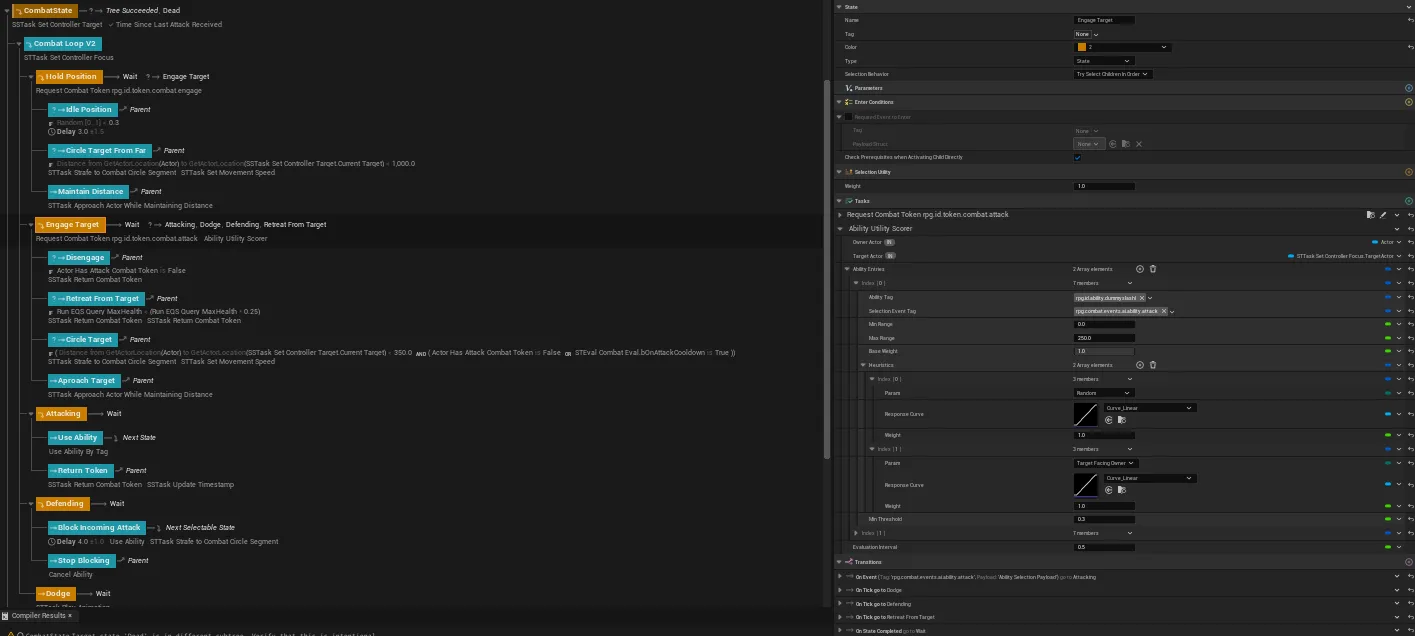
1. AbilityUtilityScorer looks at all options
2. Best ability picked → event fires to State Tree
3. Enemy requests a combat token
4. Token granted → moves into range
5. FSTTask_UseAbility triggers the GAS ability
6. Animation plays → StrikeWindowNotifyState goes active
7. Capsule traces check for player collision
8. CombatComponent handles the hit:
   - Is the player blocking?
   - Apply health damage
   - Apply poise damage
   - Play the right reaction (flinch/stagger/knockdown)
9. Ability ends → token goes back to the pool
10. Back to step 1
What I Learned
A few things that stuck with me:
-
Animation-driven hit detection is the way. Putting timing control in the animation files just makes sense. Way easier to tweak than physics nonsense.
-
Tokens are simple but effective. Such a small system but it completely fixes the “getting mobbed” problem.
-
GAS is worth learning. Took a while to wrap my head around, but now damage, effects, cooldowns, tags—it all just works together.
-
State Trees are great. Custom tasks keep everything modular. Easy to debug, easy to extend.
What’s Next
Currently working on:
- Ranged attacks (separate token pool so archers don’t compete with melee)
- Environmental hazards the AI can use against you
- Boss fights with phase-based State Trees
If you have questions or just want to chat about this stuff, feel free to reach out!
DungeonRPG is built with Unreal Engine 5.5. Everything’s in C++ with Blueprint exposure for quick iteration.